
A clearer day for members
People always know where they need to be and what needs a response.
Teamstack Mobile
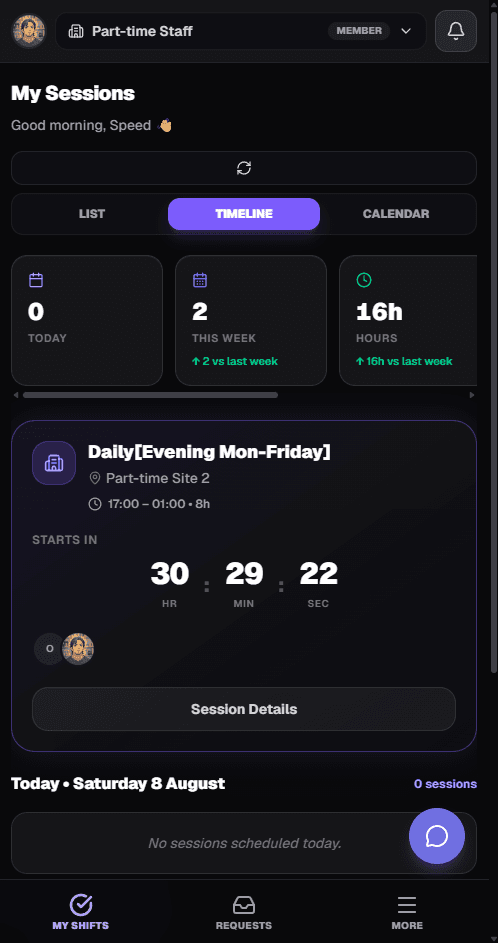
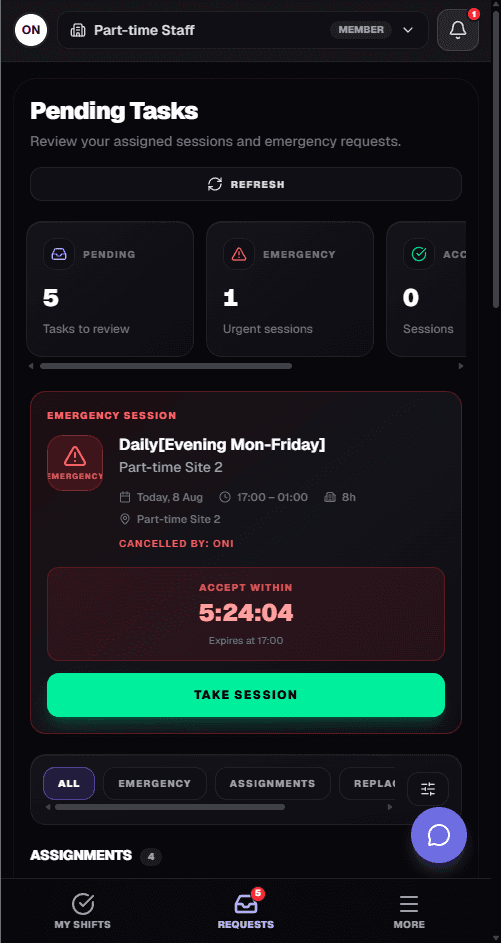
Members can check sessions, respond to requests, manage availability and attendance wherever they are.
Product walkthrough
Screen 1
Upcoming sessions, locations and times are always available.
Screen 2
No phone calls. No WhatsApp chasing.
Screen 3
Location → Clock in → Clock out.
Session attendance
Daily Evening
Part-time Site 2
17:00 – 01:00
Screen 4
Members update when they can work without contacting an administrator.
Availability
Upcoming
Tue 18 Aug
15:00 – 18:00 · College workshop
Screen 5
Session assignment, schedule changed, replacement needed, request approved — all surfaced directly to the member.
Notifications
Session assignment
Daily Evening · Site 2
Schedule changed
Science Club moved to 16:00
Replacement needed
Cover requested for tonight
Request approved
Your session is confirmed
Admin and member
Administrators run the operation. Members live in the app. Both sides stay on the same sessions.
Teamstack
Admin
Member
Create session
New assignment
See response
Accept session
Request cover
Replacement request
See attendance
Clock in
Payroll
Completed session

Connected workflow
Administrators run the operation from the dashboard. Members live in the app. Both sides stay on the same sessions, requests, attendance and payroll.

Outcome
People always know where they need to be and what needs a response.
Requests and replacements reach the phone instead of a buried chat.
Clock-in, availability and session responses happen where the work happens.
Connected product
Scheduling, requests, attendance and payroll share the same sessions. Availability feeds the rota. The mobile app is how members stay in the loop.
Connects the people doing the work to every module above.
Bring scheduling, requests, attendance and payroll together — then let the people doing the work stay in the loop from their phone.